-
Is HawkLink for Google Chrome available right now or is it still in Beta? And is it available to all agents regardless of if you are online or local?
Yes. HawkLink for Google Chrome is available in HawkSoft CMS version 5.1, which has been released to all agencies. If you are using HawkSoft Online you automatically have CMS 5.1. If you are on premise (locally hosted), you can update your software to CMS 5.1.
-
Does this work with HawkSoft Anywhere?
Yes, it works with HawkSoft Online (formerly HawkSoft Anywhere) and agencies with a local installation on their servers.
-
Does HawkLink for Google Chrome cost extra?
No. HawkLink for Google Chrome is available at no additional cost to all customers with a license to HawkSoft CMS.
-
Is there a reason the extension is available only through the HawkSoft Chrome browser?
Since our Chrome extension is meant to work with HawkSoft CMS, we wanted to ensure people downloading the extension were going through our software to get it.
While we’ve started with building an extension for the Google Chrome browser, we are closely monitoring the adoption rate of other browsers like Microsoft Edge. While we don’t have a project to extend this to Edge today, we may add this to our project board in the future.
-
Does this work for commercial lines as well?
Yes, HawkLink for Google Chrome works with all lines as long as the website loads in Chrome and uses standard HTML/CSS form fields.
- Does HawkLink for Google Chrome work with all carriers?
We have found that HawkLink works well across many websites. However, we expect there will be sites where the tool does not work well, or at all. Most of these are expected to be sites that are built on older technology.
-
What do you mean when you say data is “flooded” to a carrier website?
By “flooded,” we mean auto-filled or auto-populated from the fields in HawkSoft CMS. HawkLink for Google Chrome auto-fills / floods data from HawkSoft CMS into the website (i.e. the data in the Last Name field in HawkSoft will automatically populate into the website’s field for Last Name).
- Will HawkLink work in searching for or trying to endorse a current client on a company site?
Policy servicing (endorsements, billing inquiries, payment uploads, etc.) is a great use case example for HawkLink for Google Chrome.
-
Does HawkLink work with MGAs to do downloads?
This is a two-part question:
1. Yes, HawkLink for Google Chrome works with MGAs whose websites load in Google Chrome and use standard HTML/CSS form fields.
2. No, HawkLink for Google Chrome does not absorb any data from the websites nor does it push information back into HawkSoft CMS. HawkLink is not a download tool.
-
Is this similar to Appulate?
We are not familiar with how Appulate works, but it is likely not the same type of tool as HawkLink.
-
Is HawkLink geared more towards personal lines?
No. Commercial Coverages and other policy data is available in HawkLink if a website is launched from a commercial policy.
- Will this work with a VPN?
Yes. HawkLink is available in any site launched from HawkSoft CMS, if the setting is selected in User Preferences and Google Chrome is installed. The type of internet connection is not relevant.
-
Why don’t I see HawkLink for Google Chrome? I have Chrome as my default browser. Where is the extension and how do I install it?
In order to use or see HawkLink for Google Chrome you need to be running CMS 5.1. After you update to 5.1, click on the Website button in the CMS toolbar and you’ll be prompted to install the HawkLink Chrome extension. Now you will be able to use the HawkLink mapping tool within websites in Chrome. There are a few more settings you should tweak to make sure HawkLink works as efficiently as possible with your HawkSoft setup. Get full details on HawkLink setup in our HawkLink for Google Chrome help article or see some quick setup tips in our HawkLink blog.
-
How do I find out what my HawkSoft credentials are?
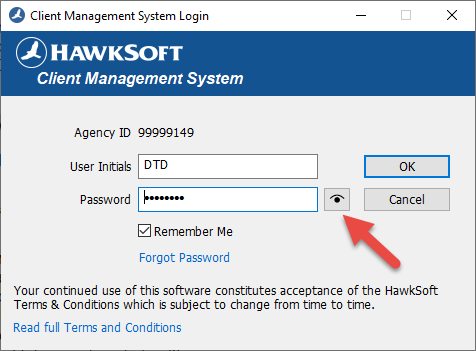
-
How do I set up HawkLink for Google Chrome? Does it need to be installed on each user's computer and will their login be applied or the administrators? Is it a preference item?
HawkLink for Google Chrome must be loaded by each user. It must also be set as the Website/Browser option in User Preferences, so each user must adjust their settings and then install the extension.
-
I am not able to open some carrier websites with HawkLink. Why?
There are many different variables that can contribute to things not working as expected. Here are some common frustrations or messages that you may encounter when first setting up and linking to websites:
-
Why am I not able to open some carrier websites?
-
Why is it running slow and taking so long to load?
-
Why am I getting messages like “Please wait,” “HawkLink is redirecting you,” or “Website is taking too long”?
-
How long should it take to load when logging in?
It’s important to check the Policy/Company Setup within HawkSoft. This will allow you to open a company's website with HawkLink by clicking the Website button in the CMS toolbar or by using the Quote feature in HawkSoft’s Action Menu. See our Policy/Company Setup help article for more details on carrier setup. If you are still having trouble, the fastest way to accurately troubleshoot problems like these is to contact our Product Support team at (866) 884-4680, Option 3 or email support@hawksoft.com.
-
Some of my staff have "rejected" the HawkLink Tool (when it first came out). Is there a way I can reinstall it and force the use of the tool?
Each user simply needs to adjust their Website/Browser setting to HawkLink for Google Chrome. This setting is available even if the user “rejected” the prompt.
-
When I open to link to a new client there are just three gray lines – it doesn’t show my open clients.
There is a known issue with larger client files. If a client file is too large (data size), it may not show in your list of available clients to link to. This issue will be addressed and fixed in CMS v5.2.
-
Why is my website not opening with Chrome? Why does my screen say “Chrome not installed”?
It is difficult to answer this without having a look at your individual system settings. Please contact our Product Support team at (866) 884-4680, Option 3 or email support@hawksoft.com.
-
If I have been using Internet Explorer, do I need to make Google Chrome my default browser?
Because HawkLink for Google Chrome works specifically within the Chrome browser, you’ll need to set HawkSoft to open websites in Chrome. You can do this by selecting User Preferences in the dropdown underneath your name on the CMS toolbar. In the Website section, select HawkLink for Google Chrome in the Browser dropdown. This will ensure any websites you open through HawkSoft will open in Chrome.
-
Do you have to open HawkLink from within HawkSoft, or can you get it to open within Google if you did not start from HawkSoft?
If you have opened Chrome separately, you can link the browser to an open client/policy in CMS. Make sure the client/policy you wish to link to is currently open in CMS. Then, click the HawkLink icon on the Chrome toolbar and select “Link to a different client." If you do not see the HawkLink icon on your Chrome toolbar, click the puzzle piece icon and then click the pin icon next to HawkLink.
-
Does the browser that opens with HawkSoft Online work with the extension and remember the mappings?
Yes, but you need to make sure that the browser that is set to open inside HawkSoft CMS is HawkLink for Google Chrome. There are multiple options. See our Policy/Company Setup help article for more details on carrier setup. If you need additional help, please reach out to Product Support.
-
What if some sites or carriers do not support the Chrome browser (or uses another browser like IE Explorer)? What is the best option to set the browser under carrier settings?
HawkLink may not work for websites that don’t load properly in Google Chrome. We suggest contacting your carrier to see if they have plans to update their website to support Chrome, which is the most popular web browser in the world. In the meantime, you can edit the specific carrier website settings in Policy/Company Setup to whichever browser is supported by a carrier.
-
Certain carrier websites don't work well with Chrome. Should I try to use Internet Explorer or just not use HawkLink for sites that don’t work with Chrome? Is the IE HawkLink still supported in a similar way for such carrier sites?
You can edit the specific carrier website settings in Policy/Company Setup and set these carriers to open with a different browser. We will continue to support Internet Explorer with the HawkLink toolbar (legacy HawkLink) for a short time. However, Microsoft has confirmed that Internet Explorer will be removed from Windows 10 at some point in the future. HawkSoft encourages carriers to upgrade their websites to load on modern browsers as soon as possible.
-
I just went to add the HawkLink extension and it says Chromium Beta. Is this correct?
No. This is not the setting you are looking for. Please navigate to your User Preferences and select HawkLink for Google Chrome as your Website/Browser preference.
- How do we change the web address associated with a company when we click the website tab?
This is accomplished by going to Settings > Policy/Company Setup. Edit the carrier, click on the Website tab, and enter the URL you wish the Website button to launch. Be sure you edit the carrier in all applicable tabs (Auto, Home, etc).
- In the past couple of years, I have run into some bizarre incompatibility issues with some companies using Chrome as a browser. Are you finding that these are rare and becoming less common?
As Google Chrome is the most popular browser currently used globally, we believe that most sites are supported and should work without browser compatibility issues.
- What if each person in our agency has a different username / login and password for an insurance company? How does that map, especially when launching multiple carrier quotes?
Mapping is not affected by different usernames or logins – the mapping process is the same. Your individual usernames and passwords are stored in HawkSoft, so as long as you filled them in under Policy/Company Setup for each user, HawkLink knows what your usernames and passwords are for each different carrier. When you are logged into HawkSoft and launch a website, it will use your username and password.
-
How will you update a password sign in when a carrier requires you to change every few months? Does HawkLink allow password updates to upload back into HawkSoft so we don't have to keep a spreadsheet with changed passwords?
Currently, HawkLink only gets data from HawkSoft CMS, so there is no data flowing back into CMS, which is where HawkLink would get the password. You will need to go in and update the password information in Policy/Company Setup. There is a possibility for a future enhancement where changed login credentials on a carrier’s website can be pushed back to HawkSoft and updated automatically.
-
Are there any conflicts with password programs like LastPass?
Not that we are aware of.
-
Does HawkLink save the username and password when you drop the mapping tool?
No. HawkLink does not save any information or data.
- Do you need to clear out your Chrome remembered passwords so it does not override HawkLink?
No necessary. Just keep in mind that when you click on the field, the Chrome passwords may be displayed in the slideout.
-
Do we have to enter the credentials for each line of business or just for the carriers?
The credentials HawkLink contains are straight from Policy/Company Setup and they are available for mapping/filling into any screen the website requires you to log into.
-
If you have multiple codes for the same carrier can the credentials be identified so you choose the correct code?
In this scenario, it would be best to set your “Login Type” for this carrier to “User” or “Agent Code” in the Website tab of Policy/Company Setup. For further details, please visit the Help section within CMS or contact our Product Support team at (866) 884-4680, Option 3 or email support@hawksoft.com.
-
How do we know if HawkSoft already has a company mapped or not? Do we need to do this for every carrier we have on our end in our office?
When you go to a website for the very first time you will be notified in the lower right corner of your screen if the website has mapping available. You can choose to accept it, reject it, or have it ask you again later. All alerts related to HawkLink can be found in the lower right corner of the toolbar.
Crowd-sourced mappings should be viewed as a “starting point” as there may be fields your agency uses that have not been mapped yet. Once you accept a mapping from HawkSoft, you can feel free to add additional mappings, or remove/modify mappings to make it work best for your agency.
-
Where can we find the crowd-sourced site map file that shows everyone you already have mapped?
Thanks to mappings submitted by insurance carriers, financial services vendors, and agents like yourself, HawkLink has a growing list of commonly used insurance-related websites. This is merely a sampling of the carrier websites with mappings. It does not reflect a comprehensive list. Upon the first visit to a given site, HawkLink will check the cloud server and see if there is a mapping available for it. If there is, the user will be notified in the lower right corner.
-
Can we change a mapped field after you’ve added it if got mapped incorrectly? I noticed in your demo that Lucy showed "Male" still after you added her, so can that be changed to “Female” after you’ve added it? This was not possible on the earlier version of HawkLink.
Yes, you can change/correct a field that was incorrectly mapped.
Also, the Gender entry on our demo site is a drop-down menu, and they can be particularly challenging to flood data to. After selecting Lucy, clicking the Flood Now button would have changed that Male to Female. If you notice anything not flooding correctly, click that button to see if that forces the flooding.
-
When we're asked if we want to replace the current mapping, do we accept that?
Only if you have customized or changed the mapping. If you accidentally accept a mapping, you can click the 3 dots in the menu and select “Revert to Previous Mapping.”
-
Will mappings need to be exported for each internal mapped page? Or will it cache all mapped subpages under the parent domain?
It is based on the parent domain.
-
Is there a setting in Google Chrome that blocks mapping? Mine will not map any field.
It is difficult to answer this without having a look at your individual system settings. Please contact our Product Support team at (866) 884-4680, Option 3 or email support@hawksoft.com.
-
Can we map from another website back into HawkSoft?
No, HawkLink only retrieves data from HawkSoft CMS and pushes it to carrier and insurance websites. However, you can pass back a screenshot of a website through "Capture" or "Print (Virtual Printer)".
-
How do you map the address out of HawkSoft and into the Zillow website?
You will need to add the Zillow website/button to your toolbar. This can be done under Settings > Computer Specific Settings > External Tools. Give it a name, choose Website, and then enter the URL address in the Command field. Now click on your new Zillow button on the toolbar. Enter the address in the search field and begin mapping.
-
Can we map yes/no fields and set up an agency default for some quoting fields?
Yes/no fields will depend on the site. I tested this with Hastings Mutual as their Personal Auto quote process begins with 16 Yes/No questions as drop-down selectors. I mapped each of them with “Fixed Values” of either “Yes” or “No” and the mappings flooded those answers to each dropdown on my next visit. If the Yes/No responses are in the form of radio buttons, flooding may not work.
-
What if the mapping box doesn't come up on one of our carrier sites?
You can click on the HawkLink icon and link to another client.
-
Can we narrow the box?
If you are referring to the mapping tool, it can be collapsed or expanded, but you cannot change its size.
-
If you map it once for some items and then want to update the mapping with additional fields, will you have to map both the old fields and new fields again?
No, you are always adding to or updating what is already mapped on your computer.
-
Is Westfield Insurance a site that does not work with HawkLink? They just went through an update and made their platform available on most web browsers, getting away from Internet Explorer. But I can only get so far and then get kicked out, but only when using HawkLink for Chrome.
We have received reports that Westfield’s site is not working with HawkLink as expected. We will be looking at this site specifically, to determine if any change in HawkLink could improve this functionality.
-
Is there a risk of clearing cache/cookies and losing our mappings? Where will they be stored?
The mapping files are stored as part of Google Chrome extension data in the user AppData folder. Clearing Cookies or Browser History will not affect this data.
-
When you click on the Website button it is only taking you to one website. If we have mapped multiple carriers will it give us an option of which website we want to visit?
If you want to quote with several websites at once, you can select Quote/Export in the Action menu. This will allow you to select the carriers you want to quote with, and HawkLink will open each website in a different tab. From here, you can use HawkLink to autofill the data and quickly get quotes from each carrier.
- What do you do when a field is not mappable?
It is difficult to answer this without seeing what is happening. Please contact our Product Support team at (866) 884-4680, Option 3 or email support@hawksoft.com.
- How do you save mappings you have added?
HawkLink saves and remembers mappings automatically and on each future visit it will know to place data in the same spot.
-
If we visit a site and accept the mapping, then later someone uploads better mapping, will that new mapping update on my version of the mapping?
No. If you would like to check for an updated mapping, click the “Update Site Mappings” button.
-
If we already have our own site mapping will we still be asked about additional mappings that are available?
Yes. If you have already completed your own mappings, it would be best to click “Reject” when prompted that a mapping is available.
-
Can you add mappings to the templates when carriers change sites?
Yes. Mappings can be modified at any time, for any reason.